Information System : Linux apprendre2 3.10.0-1160.119.1.el7.x86_64 #1 SMP Tue Jun 4 14:43:51 UTC 2024 x86_64
Disable Function : Koko Analytics for WordPress
===========
[](https://raw.githubusercontent.com/ibericode/koko-analytics/master/LICENSE)
[](https://wordpress.org/plugins/koko-analytics/advanced/)
[](https://wordpress.org/support/plugin/koko-analytics/reviews/)

[Koko Analytics](https://www.kokoanalytics.com/) is a simple, open-source, lightweight (< 850 bytes) and privacy-friendly website analytics plugin for WordPress.
It aims to be a simple replacement for Google Analytics that respects the privacy of your visitors. Nothing visitor specific is tracked, only aggregated counts.
You can view a [live demo of Koko Analytics here](https://www.kokoanalytics.com/?koko-analytics-dashboard).
> [!TIP]
> We're working on a [standalone version of Koko Analytics](https://github.com/koko-analytics/koko-analytics) that you can self-host to track any site, not just WordPress sites.
## Features
- **Plug and play**: After activating the plugin, stats are recorded right away.
- **GDPR and CCPA Compliant** by design.
- **No external services**.
- **No personal information** or anything visitor specific is tracked.
- **No cookies** (optional).
- **Fast**: Handles thousands of daily visitors or sudden bursts of traffic without breaking a sweat.
- **Lightweight**: Adds less than 850 bytes of data to your pages.
- **Storage**: A year worth of data takes up less than 5MB of database storage.
- **Cached**: Fully compatible with pages served from cache.
- **Open-source**: GPLv3 licensed.
- **Translated**: Fully translated into English, German, Dutch, Spanish, Japanese, Croatian, Swedish, Danish, Finnish, Italian, Korean and Russian.
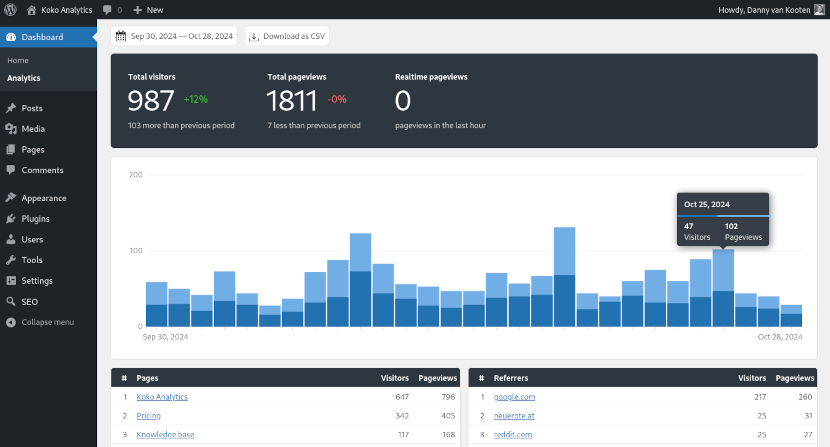
Screenshot of the Koko Analytics dashboard. You can view a live demo here.
### Koko Analytics Pro
Koko Analytics is a freemium WordPress plugin. The core features listed above are available for free. Certain advanced features are bundled in an add-on plugin called Koko Analytics Pro:
- Outbound link tracking
- Track form submissions
- Export dashboard view to CSV
- Periodic email reports
You can [purchase Koko Analytics Pro from our site](https://www.kokoanalytics.com/pricing/).
## Installation
### Requirements
Note that these are minimum required versions. We recommend running an [officially supported version of PHP](https://www.php.net/supported-versions).
- WordPress 6.0 or higher.
- PHP 7.4 or higher.
### Installing latest stable release
You can download a pre-packaged version of Koko Analytics here:
- [Koko Analytics on WordPress.org](https://wordpress.org/plugins/koko-analytics/)
- From the [GitHub releases page](https://github.com/ibericode/koko-analytics/releases).
- From your WordPress admin by searching for "Koko Analytics" in the "Add plugin" screen.
After extracting this package into your `/wp-content/plugins/` directory the plugin is ready to be used right away.
### Installing latest development version
To run the latest development version of the plugin, take the following steps.
First, clone or download the repository into your `/wp-content/plugins/` directory
```
git clone git@github.com:ibericode/koko-analytics.git
```
Create the autoloader using [Composer](https://getcomposer.org/).
```
composer install
```
Install client-side dependencies using [NPM](https://docs.npmjs.com/cli/configuring-npm/install).
```
npm install
```
Build the plugin assets by issuing the following command:
```
npm run build
```
## Usage
Stats will be collected right away after you install and activate the plugin.
You can view your stats on the **Dashboard > Analytics** page.
## Help and documentation
The [Koko Analytics knowledge base](https://www.kokoanalytics.com/kb/) contains general help articles on effectively using the plugin.
We also have a [repository of sample code snippets](https://github.com/ibericode/koko-analytics/tree/master/code-snippets) to help you modify or extend the plugin's default behavior.
## Contributing
You can contribute to Koko Analytics in many different ways. For example:
- Write about the plugin on your blog or share it on social media.
- [Translate the plugin into your language](https://translate.wordpress.org/projects/wp-plugins/koko-analytics/stable/) using your WordPress.org account.
- [Vote on features in the GitHub discussions idea board](https://github.com/ibericode/koko-analytics/discussions?discussions_q=is%3Aopen+sort%3Atop).
- Purchase [Koko Analytics Pro](https://www.kokoanalytics.com/pricing/) for its advanced features or simply to help fund development and support costs.
## License
GNU General Public License v3.0